In this blog post, I’m excited to share my experience of how I automated file organization using Python and Cron. Like many others, I encountered the daunting task of managing numerous files without a proper organizational structure.
Searching for files became time-consuming, and maintaining structure seemed like an insurmountable challenge. Additionally, when attempting to push my specific files to GitHub, the absence of a streamlined organization made the task even more difficult.
However, by creating a Python script to organize the file and scheduling a cronjob, I was able to automate the process. Throughout this post, I’ll guide you through the steps I took, from understanding Python script to setting up the Cron Job.
Overview
The project is divided into three main parts:
Part 1: Understanding Python Script
sorts all my files into separate directories based on their names. It groups the files with the same name into a common folder to streamline my file organization.Part 2: Scheduling Cronjob
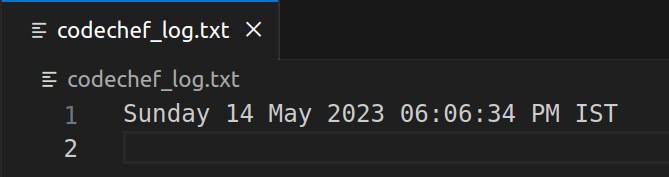
execute my Python script every day at a scheduled time and after execution, save the console output into a log file.Prerequisite
Linux-based operating system (this guide assumes a
Ubuntu 22.04environment).Python (modules used OS, Subprocess)
Creating Script File
Open Terminal (in Linux using
Ctrl + Alt +T)Change the directory to your preferred location using
cd /path/to/folderCreate a new file using
touch <file_name>.pyGive Executable permission to the file using
chmod 777 <file_name>.py
Part 1: Understanding Python Script
Import
modulesimport os
import subprocessSetup
targetandcurrentdirectorycurr_dir = "/path/to/current/directory"
target_dir = "/path/to/target/directory"Note: If your files are in the same directory as your
python scriptyou can just useos.getcwd()for thecurrentdirectory.Walkthrough
currentdirectory andlist filesfor root, dirs, files in os.walk(curr_dir):
for file_list in files:
temp_file = file_list.strip(".cpp")Create separate
directoryfor everyuniquely named filecommand = f"mkdir {target_dir}/{temp_file}"
result = subprocess.run(command, stdout=subprocess.PIPE, shell=True, universal_newlines=True)
print(result.stdout) #for testing the outputCopy files from
currentdirectory to their respectivedirectorycommand1 = f"cp {curr_dir}/{file_list} {target_dir}/{temp_file}/"
result = subprocess.run(command1, stdout=subprocess.PIPE, shell=True, universal_newlines=True)
print(result.stdout) #for testing the outputSetup
permissionscommand3 = f"chmod a+rwx {target_dir}/{temp_file}"
result = subprocess.run(command3, stdout=subprocess.PIPE,
shell=True, universal_newlines=True)
print(result.stdout) #for testing the outputPrint current
dateandtimeThis will be used as our log file
command4 = "date"
result = subprocess.run(command4, stdout=subprocess.PIPE, shell=True, universal_newlines=True)
print(result.stdout)
Script Content
import os |
Testing Script
To check whether your script is working correctly. Execute :
python -m /path/to/folder/<file_name>.py
Part 2: Scheduling Cronjob
Understanding Cron and crontab
Cron: It is a service or utility used for scheduling and automating an execution of a script at a particular time.
Crontab: It is a file that contains a set of commands which tells when to execute and how many times to execute.
Accessing crontab
In the terminal, write
crontab -eand pressEnterSelect your preferred
editorfrom the options (only for the first time)
Adding cronjob
Syntax:
* * * * * command_to_be_executedExplanation: The
cronsyntax consists of five fields representingminute,hour,day of month,monthandday of weekrespectively. Using appropriate values or wildcards (*), you can specify the desired schedule.
Scheduling Python Script and log file
Syntax:
* * * * * python -u "/path/to/your/script.py" >> /path/to/<file_name>.txtExample:
20 17 * * * python -u "/home/starvader/ashutosh_workspace/Project/file_to_folder/script.py" >> /home/starvader/ashutosh_workspace/Project/file_tO_folder/codechef_log.txtExit the
editor.
Verifying cronjob
- In the terminal, write
crontab -land pressEnter, yourcronjobwill be visible to you.
Logfile Output
Conclusion
By setting up and scheduling the cronjob, the Python script will run automatically every day at the specified time. It will organize files, create folders based on file names, copy files to their respective folders, set appropriate permissionsand store the execution details in a log file. This daily routine simplifies and automates the file organization process, improving efficiency and maintaining an organized file structure.
Thank you for reading!